Wednesday, January 02, 2013

Possible bug with Windows’ Save As dialog

This morning I ran across a minor bug with the Windows common “Save As” dialog.  I ran across the bug in the Chrome browser, and then was able to reproduce it using plain old Windows Notepad (notepad.exe).  Bugs like this in common Windows components are rare enough that I figured it was worth a quick blog post.

Steps to reproduce:

1. Open the Save As dialog for an application.  (In my example, I opened a file named “myfile.txt” in Notepad, then did File | Save As.)

2. Navigate to a directory that already contains a file with the same name as the file to be saved.

SaveAs

3. In the Save As dialog, create a new folder, e.g. by clicking the “New folder” button.

4. Still in the Save As dialog, drag the existing copy of the file to the new folder to move it there.

MoveFile

5. Click the Save button.

At this point, I would expect Windows to just go ahead and save the file.  However, at this point Windows puts up a “File already exists. Do you want to replace it?” confirmation message, as if the existing copy of the file had not already been moved out of the way.

Confirmation

This is only questionably a “bug,” since it doesn’t really hurt anything by happening, other than possibly causing some minor surprise/confusion on the part of the user, who may think they didn’t actually move the original copy of the file as they had intended. 

I assume this is happening because the dialog is doing some kind of caching of the contents of the destination folder at the time the folder is opened, and then not actually comparing against the actual contents on disk again at the time that the user clicks the Save button.

I encountered this on Windows 7 (Pro, 64-bit).  I’m not sure whether or not this also happens on other Windows versions.

Obviously this “bug” is not a big deal at all, but irrespective of the occasionally-questionable popular perception of the quality of Microsoft products, I find Windows 7 to be generally pretty rock-solid stable when it comes to basic day-to-day operations (as it should be), so I was surprised to observe this behavior.  I wonder if this is “working as intended,” or if Microsoft actually would consider this a bug?

Saturday, September 22, 2012

Software project estimation: A little hands-on experience goes a long way

Earlier this month I attended a one-day Agile software development class at The Forge by Pillar in Ann Arbor.  A few of my teammates from work attended the class with me; the class ended up having around 25 attendees total, with maybe a third of those being developers.

On the morning of the class, we learned that as part of the activities of the day, we would be implementing a functional clone of a classic arcade game of our choice (Pac-Man, Space Invaders, Centipede, etc.), using a tool called Scratch, in 3 20-minute development sprints.

This initially struck me as aggressive -- a new game, complete with graphics, written starting from scratch, done in not a day, but in 60 minutes?  I suggested to my team that we do an implementation of Frogger, as that struck me as being relatively straightforward to implement.

The instructor then went on to ask if we had any "spikes" (unknowns that would merit taking time to do a proof-of-concept, if this were a real project) regarding the Scratch tool that we'd be using for development that he could answer for us prior to the first development sprint.  Not having been familiar with Scratch prior to taking this class, I found it difficult to come up with any questions more specific than "Um, what exactly is Scratch, and how does it work?"  (I did come up with some better questions such as "How does sprite collision detection work in Scratch?" but the point here is that it was hard to even ask questions about a framework that I wasn't familiar with.)

After writing up user stories (requirements) with my team, the class instructor did a quick demo of the Scratch tool; then, the first development sprint started, and I was able to get hands-on with the Scratch tool for the first time.  Within just the first couple of minutes of that first development sprint, I had a far better idea of what Scratch was, what it could do, and how long it would take to do things with it.  In short, Scratch allows you to set up sprites (characters, objects) on a playing field, and then manipulate them via a simple "drag-and-drop" event-driven programing framework.

AgileFrog-Scratch

This experience was striking as an illustration of the additional accuracy with which a project can be estimated, and how much better specific "unknowns" about an implementation can be identified, after there has been an opportunity for the development team to get some hands-on engagement on the project – particularly in projects involving a language or framework that is new to the development team prior to the project.

Wednesday, September 12, 2012

Loving my iPad Pocket / $0-Monthly-Fee iPhone

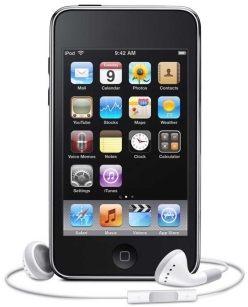
What’s my favorite technology purchase that I’ve made in the past 2 years?  It’s my iPad Pocket Edition; I also like to call it my $0-monthly-fee iPhone.

That is, my iPod Touch.

ipod_touch_4th_gen

My iPod Touch (or “iTouch” for 33% less syllables) has become one of the items that are always in my pants pockets when I leave the house in the morning, along with my keys, wallet, and phone. 

Why do I like the iTouch so much?  When I’m in a wi-fi zone – which in a typical day for me, I am in much more often than not – it can do essentially everything an iPhone can do except make phone calls.  It’s amazing to have the following readily available from a device I carry my pocket, almost all of which are free or very inexpensive:

  • Web browser
  • Calendar with cloud sync
  • Music (mp3 player, Pandora), Podcasts
  • To-do list with cloud sync (Appigo Todo)
  • Clock / stopwatch /countdown timer
  • Games (tons of great, inexpensive options)
  • Physical game aids like 7 Wonders Scorer
  • Support for 99% of iPhone apps in the App Store

Insofar as they affect me, there are only three real major “missing features” affecting the iPod Touch as compared to an iPhone:

Can’t make or receive phone calls.  I work around this by carrying, in addition to the iTouch, a nice compact “dumbphone,” the Samsung Hue, for which I have a prepaid plan with Verizon that gets me phone service for a grand total of $7.50/month.  I get very few minutes for that price, but since I only use this phone for quick calls to home and for emergency purposes, I’ve never come close to running out of minutes.

No Internet access outside of wi-fi zones.  This is occasionally bothersome, but only very occasionally; typically a couple of times per month when waiting to pick up a pizza or to get a haircut.  For the significant cost savings vs. a full phone and data plan – more on that below – it’s certainly something that I can live with.  And many apps have good “offline mode” support – implemented mostly to cater to iPhone users on airplanes, but working just fine for iPod Touch owners too.

No GPS.  When I take an occasional long trip alone to an unfamiliar place, I do notice the lack of GPS capability, but it’s nothing that can’t be worked around “the old fashioned way” by just printing directions off the Internet before leaving.  (How did people find their way around before the Internet?)  On vacations, I’m pretty much always travelling with my wife, and we do spring for a smartphone for her – as a so-called “stay at home mom” she’s actually out and about on a daily basis far more than I am – so we just use her phone’s GPS.  If I travelled alone more often, I’d make a one-time purchase of a standalone GPS device for the car.

The cost savings vs. an iPhone are, to me, well worth the minor drawbacks:

  iPod Touch 4th Gen (32 GB) + Prepaid dumbphone iPhone 4S (32 GB)
Up-front hardware cost $275 + $50 = $325 $300
Monthly fee $0 + $7.50 = $7.50 $70
Total over 2 years $325 + ($7.50 * 24) = $505 $300 + ($70 * 24) = $1980

About $1500 to spend however I like, in return for a couple of (for me) minor drawbacks?  Yep. I’m in.

I like the iPod Touch enough that even though I’ve had my current 4th Gen iTouch for only about a year and a half, I’m also in for another $300 on the new iPod Touch 5th Gen that was announced earlier today.  To paraphrase a tip from @shanselman, it’s worth spending money on something that you’re going to get heavy use out of every day – and for me, the iPod Touch is that.  And at an amortized cost of under $13/month over the next two years, I consider it a bargain.

Saturday, August 18, 2012

Chrome Browser Deal-Breaker: Ctrl+Tab behavior

Depending on who you ask, Google Chrome is the world’s most popular browser here in mid-2012.  It’s fast, lightweight, and standards-compliant.  However, Chrome has one major (for me) issue that will prevent me from ever using it as my primary browser: The lack of any way to modify the behavior of the Ctrl+Tab keyboard shortcut to switch between tabs.

Like the other leading desktop web browsers Firefox and Internet Explorer, the default behavior of the Ctrl+Tab keyboard shortcut in Chrome is to switch between tabs in left-to-right order.  I’ve believed for years that this behavior is inefficient at best, and the default switch order for Ctrl+Tab should be most-recently-used (MRU) order. The default left-to-right Ctrl+Tab switch order makes it impossible to quickly use the keyboard to toggle back and forth between two tabs when there are multiple tabs open.  Left-to-right order is also inconsistent with the long-established MRU order for the keyboard shortcut for switching between open applications (Alt+Tab in Windows and many Linux distributions; Command+Tab in OSX).

Unlike Firefox and Internet Explorer, however, Chrome offers no way to change the default Ctrl+Tab behavior, even via add-ons / extensions.  To compare the three leading desktop browsers:

  • Firefox: Has an excellent addon called LastTab which has a great implementation of MRU Ctrl+Tab behavior (including an Alt+Tab-like preview window of the tabs arranged in MRU order);
  • Internet Explorer: Has a “Use most recent order when switching tabs with Ctrl+Tab” checkbox in its Advanced Options settings;
  • Chrome: There’s no configuration setting to change the Ctrl+Tab behavior.  The Ctrl+Tab key combination apparently is defined as “reserved,” so extensions can’t change its behavior either.

There’s a long-standing (2008) Chromium bug, Issue 5569, logged for Chrome’s Ctrl+Tab behavior; however, it was marked as “WontFix” shortly after it was opened.  Google does acknowledge the demand for MRU switching behavior in a brief statement on the Chromium project’s User Experience > Tabs page:

Ctrl+Tab, Ctrl+Shift+Tab, Ctrl+PgUp and Ctrl+PgDn can all be used to switch back and forth between tabs. While there is great demand for an MRU-ordered switcher, we've so far been unable to find an MRU switcher that makes sense beyond the first three most recent tabs, or one that works well with background-created tabs.

I’m somewhat bemused by this statement; there are many good reference implementations of MRU switching order available.  One specific example is the LastTab Firefox extension mentioned above; I’ve used that for years and have been very happy with it.

If you’d like to add your vote to this issue, feel free to head over to Chromium Issue 5569 and “star” the issue and/or leave a comment.

This issue is a deal-breaker for me to consider adopting Chrome as my primary desktop web browser – Chrome’s benefits don’t outweigh the potential several-times-per-day productivity hit of not being able to rapidly and easily toggle between two specific browser tabs.  In the meantime, I’m happy to continue using Firefox as my own primary browser. 

In occasional situations where I do need to use Chrome and have multiple web pages open, going old school and opening each web page in its own browser window (instead of using multiple tabs) is a tolerable workaround (since that lets me use the operating system’s MRU window switching behavior to rapidly toggle back and forth between two windows as needed).

Sunday, August 05, 2012

Comcast Internet subscribers can’t watch college football online via ESPN3 this fall?

Update 8/19/2012: I just tried again watching a couple of different live sporting events at home via espn3.com, and today, it worked fine -- I wasn't blocked. Barring any word on this from Comcast or ESPN, I guess we'll just need to wait until kickoff to see if watching college football on espn3.com this fall via an Internet-only Comcast subscription is going to work or not.

Update 8/30/2012: ESPN has posted an WatchESPN / ESPN3 FAQ. In short, it sounds like ESPN3 now only carries "online-exclusive" content -- that is, minor games that aren't being shown on ESPN/ESPN2. To watch ESPN content that's being shown on TV online, you need "WatchESPN" -- and that requires a paid TV subscription to ESPN (on top of a broadband Internet subscription). So, Internet-only customers are out of luck this year, sounds like. :-( Maybe ESPN will sell their content directly to consumers in the future, like Major League Baseball has already figured out how to do. You can buy an entire season of MLB (thousands of games!) for $20 or $25, depending on type of device; I'd happily pay $25 for an entire season of college football.


For the last 3 years or so, I have not subscribed to any cable or satellite TV service, going instead with free over-the-air HD network television via a DIY antenna, and using AT&T DSL and (later) Comcast cable for Internet service.

I’m a college football fan, and in the fall, I have for the past couple of years used the very nice service at espn3.com (now rebranded as WatchESPN) via my HTPC to watch college football games that were shown on one of the ESPN network channels, but not shown on the ABC network (which I can watch in HD for free via antenna). 

Upon attempting to demonstrate this setup to a friend of mine this morning, though, I was surprised to be presented with a new error message when attempting to view a live event on espn3.com: “Access to this content requires a television subscription. Please contact your TV provider to subscribe.”

ESPN3_Comcast

:-(

Apparently something has changed in the arrangement between ESPN and Comcast Xfinity – without any notice to me, the customer – where it’s now not just checking to see if my ISP is supported by ESPN3; it’s now additionally checking to see if I have a television subscription through that same ISP (Comcast), which I do not.  If I did have a full television subscription, I wouldn’t be trying to use espn3.com; I’d just turn on my television!

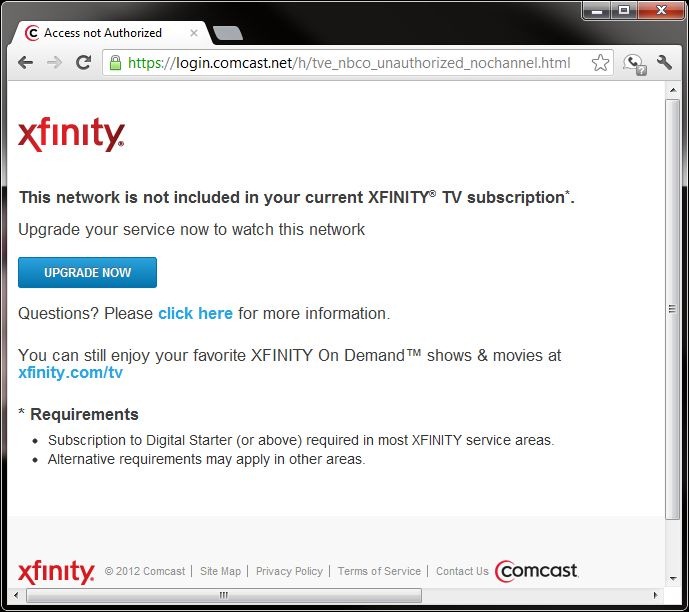
Apparently this is the new trend, as I also found just last week that my family is not permitted to access any of the live 2012 Olympics coverage currently available in the United States via nbcolympics.com, for the same reason: I only have an Internet subscription through my ISP, not a full television subscription.

NBC_Comcast

From a standpoint of trying to be fiscally responsible, it isn’t worth it to me to pay an additional $200 to be able to watch 14 Saturdays’ worth of college football from home this fall (figuring about an additional $50/month for the duration of the 4-month college football season for a television package from Comcast that includes ESPN, above and beyond the Internet service that I’m already paying for).  So it looks like I’ll be visiting friends’ homes or going to sports bars to watch any college football game that aren’t being shown on the broadcast networks (ABC, CBS, and for Notre Dame home games, NBC) this fall.  Guys, if you’re reading this, I’ll bring the beverages!

This development is pretty disappointing, to say the least.  I’d consider switching ISPs – if Comcast didn’t have a local monopoly on high-speed Internet at my location.  Hopefully, in the future, ESPN and other content providers will figure out how to profitably provide their coverage directly to consumers via the Internet, regardless of ISP. Clearly, the technology is ready and available (it worked great for me for the last couple of college football seasons prior to this year); it’s just the business side of things that needs to be worked out.

Ah, well.  Ultimately, I’ll be very happy/thankful if this situation is the biggest problem that my family encounters this fall!  #firstworldproblems