Since only internal employees would be using the site, I decided to set it up to use the Windows Integrated Authentication provided by IIS 5, so users of the site would automatically be logged in using their domain credentials (rather than being prompted for a set of credentials).
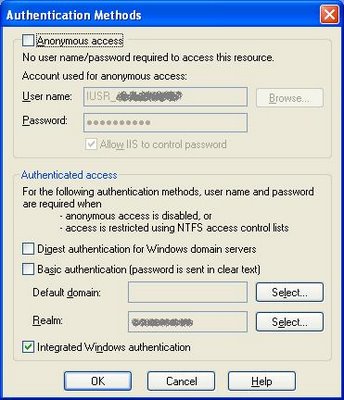
This worked great when accessing the site in Internet Explorer. However, when using Firefox, I would get prompted by Firefox for a set of credentials when first accessing the site. Entering my domain username and password did allow me to access the site successfully.
I wanted to avoid the login prompt with Firefox, so I Googled for firefox integrated authentication prompt. This turned up a couple of good results that pointed me to the solution:
- In the Firefox Location bar, type about:config and press enter.
- In the Filter bar that appears, type Network.automatic-ntlm-auth.trusted-uris and press enter.
- Under "Preference Name", double-click on Network.automatic-ntlm-auth.trusted-uris, and enter the name of the web server machine in the dialog that appears.
Now users are able to access the site without being prompted for credentials -- Firefox uses Integrated Authentication and automatically uses the user's domain credentials to log in.


 Posts
Posts


No comments:
Post a Comment
Non-spammers: Thanks for visiting! Please go ahead and leave a comment; I read them all!
Attention SPAMMERS: I review all comments before they get posted, and I REPORT 100% of spam comments to Google as spam! Why not avoid getting your account banned as quickly -- and save us both a little time -- by skipping this comment form and moving on to the next one on your list? Thanks, and I hope you have a great day!